Media Prompt Builder
AI Seamless Pattern Prompt Builder for MidJourney, Ideogram & Surface Pattern Design
AI Seamless Pattern Prompt Builder for MidJourney, Ideogram & Surface Pattern Design
Couldn't load pickup availability
Stop wasting hours trying to describe a seamless pattern idea to AI and still getting the wrong repeat, the wrong scale, and the wrong palette.
Most pattern designers hit the same problems: the repeat does not tile correctly, the motif scale feels off, the spacing is messy, the palette misses the mood, and the final design is not ready for real products or professional upload.
This builder fixes that.
In less than 2 minutes, you can generate a fully structured seamless pattern prompt built for cleaner repeats, stronger collections, and faster product-ready design creation. Just use the dropdowns and instantly create prompts for motif, layout, repeat type, color palette, scale, texture, platform specs, and negative prompting — ready to paste directly into MidJourney or Ideogram.
If you want better seamless repeats, cleaner colorways, stronger collections, and a faster surface pattern workflow, this is the system that gets you there.
What You Get Instantly
Main Pattern Prompt
Generate a complete seamless repeat prompt covering motif, secondary motif, art style, color palette, background, layout, repeat type, scale, density, spacing, texture, line weight, finish, era, and negative elements. The result is a stronger, more commercially usable seamless pattern prompt ready for MidJourney or Ideogram with tiling direction included.
Colorway Variation Brief
Create the same pattern in three sellable colorways: original, light, and dark. This output helps you expand one design into a more professional product range with palette shifts, background swaps, and naming suggestions for collection uploads.
Scale and Layout Brief
Generate the same motif in three scales: ditsy small, medium balanced, and large statement. Perfect for adapting one design across different products, customer types, and print surfaces.
Platform Upload Brief
Get practical upload guidance for major print-on-demand and fabric platforms, including canvas size, file format, color mode, DPI, and repeat requirements for places like Spoonflower, Redbubble, Printify, and Society6.
Pattern Collection Brief
Build a full coordinated pattern collection with five connected designs: hero print, secondary coordinate, small ditsy, geometric coordinate, and solid texture blender. Everything you need to create a stronger, more sellable collection in one workflow.
Why This Builder Converts Better Than Guessing
- Better seamless repeats: Create cleaner pattern prompts with stronger tiling direction
- Faster workflow: Build structured prompts in minutes instead of experimenting for hours
- Better AI output: Reduce messy spacing, broken repeats, and inconsistent scale
- Stronger product ranges: Expand one design into multiple colorways and scales
- Better collection building: Create coordinated pattern families instead of isolated designs
- No prompt-writing skill needed: Just choose from the dropdowns
32 Dropdown Fields — No Prompt Writing Required
USE CASE — output type (25 options), platform (20 options), product type (20 options), target market (20 options), collection format (10 options)
MOTIF — main motif (35 options), secondary motif (15 options), motif style (20 options), motif detail (10 options), motif mood (15 options)
LAYOUT — repeat type (15 options), scale (10 options), density (10 options), spacing (10 options), orientation (10 options)
COLOR — color palette (20 options), color count (10 options), background color (15 options), color mood (10 options), season (15 options)
STYLE — art style (20 options), texture (10 options), line weight (10 options), finish (10 options), era (15 options)
TECHNICAL — aspect ratio (10 options), tile setting (10 options), resolution (10 options), print constraint (10 options), negative elements (10 options), extra modifiers (10 options)
Works With Major AI Image Tools
MidJourney v6.1 --tile · Ideogram v2 · Flux 1.1 Pro · Stable Diffusion SDXL · Adobe Firefly 3 · Leonardo AI · Nano Banana 2 · DALL·E 3
10 Ready-to-Use Seamless Pattern Presets Included
- Botanical Floral — wildflowers, watercolor styling, sage green and pink palette
- Sacred Geometry — mandalas, midnight blue and gold, spiritual decorative feel
- Cottagecore Garden — mushrooms and wildflowers with warm earthy tones
- Nordic Geometric — Scandinavian minimalism in navy and cream
- Japanese Wave — woodblock-inspired indigo pattern with larger scale drama
- Halloween Dark — gothic skulls and dark motifs in black and crimson
- Christmas Festive — pine, berries, and seasonal motifs in deep red and forest green
- Abstract Watercolor — loose painterly forms in soft pastel rainbow tones
- Boho Tribal — ikat-inspired geometric motifs in terracotta and cream
- Vintage Toile — pastoral scene styling in classic navy and white
Each preset is already written and ready to use. Copy, paste, generate.
How It Works
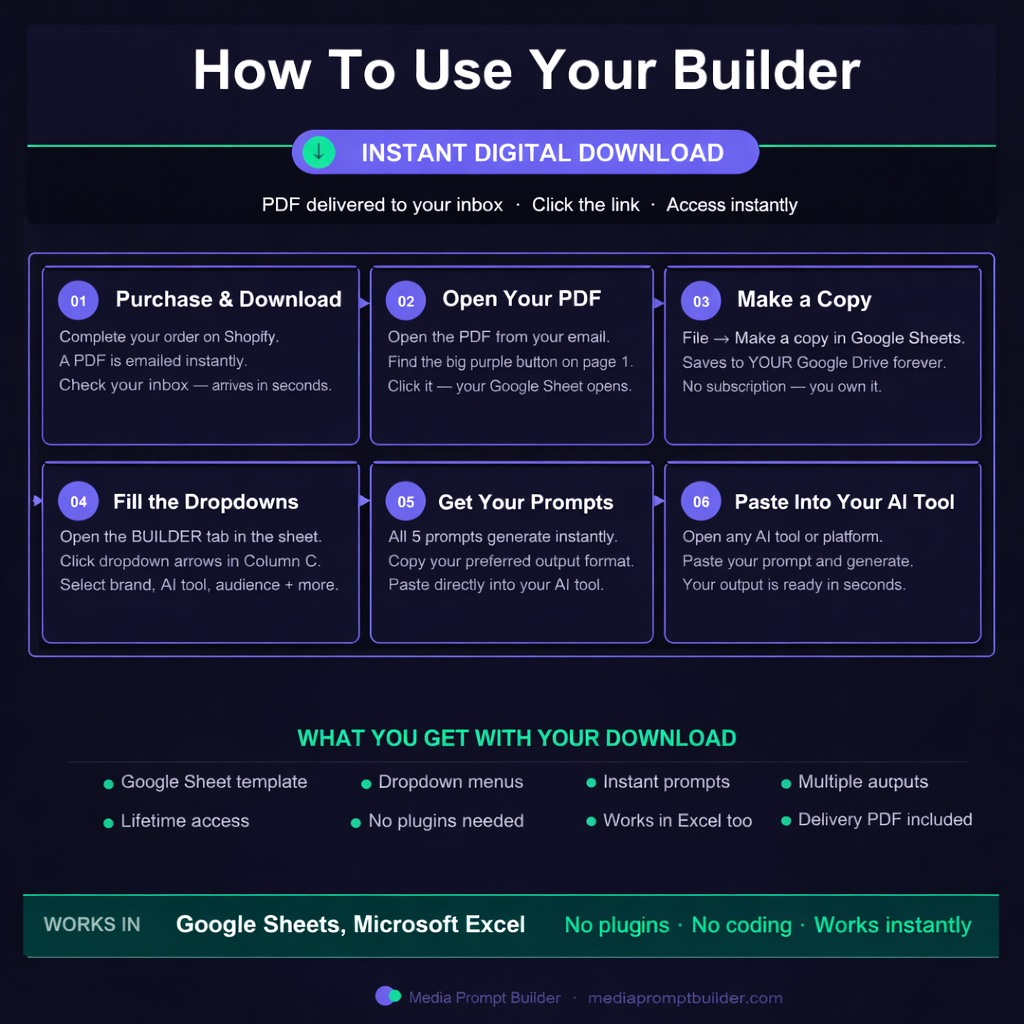
- Purchase and receive your PDF instantly
- Open the link inside to access your Google Sheet
- Make your own copy and save it to Google Drive
- Fill Column C using the dropdown menus
- Copy any prompt and paste it into MidJourney or Ideogram
Who This Is For
- Surface pattern designers creating seamless repeat collections
- Spoonflower sellers building fabric and wallpaper designs
- Redbubble and Society6 creators making all-over print products
- Print-on-demand sellers creating coordinated product collections
- Textile, stationery, and home decor designers
- Etsy sellers creating digital pattern downloads
- Brand owners building custom repeat prints for products
- Anyone creating seamless patterns for commercial use
Instant Digital Download
- PDF delivered immediately after purchase
- Direct access link to your Google Sheet inside the PDF
- No subscription
- You own it forever
- Works in Google Sheets and Microsoft Excel
- No plugins, no coding, no setup required
Why Buy This Now
Every hour you spend guessing with pattern prompts is an hour you are not building a stronger collection.
This builder gives you a repeatable system for creating better seamless repeats, stronger colorway variations, cleaner scale options, and more professional platform-ready pattern collections without starting from zero every time.
If you want AI-generated patterns that feel more polished, more sellable, and more ready for real products, this is the tool that gets you there.
Share